
Stop Trying to Remember Everything: How Smart Personal Trainers Automate Recurring Tasks
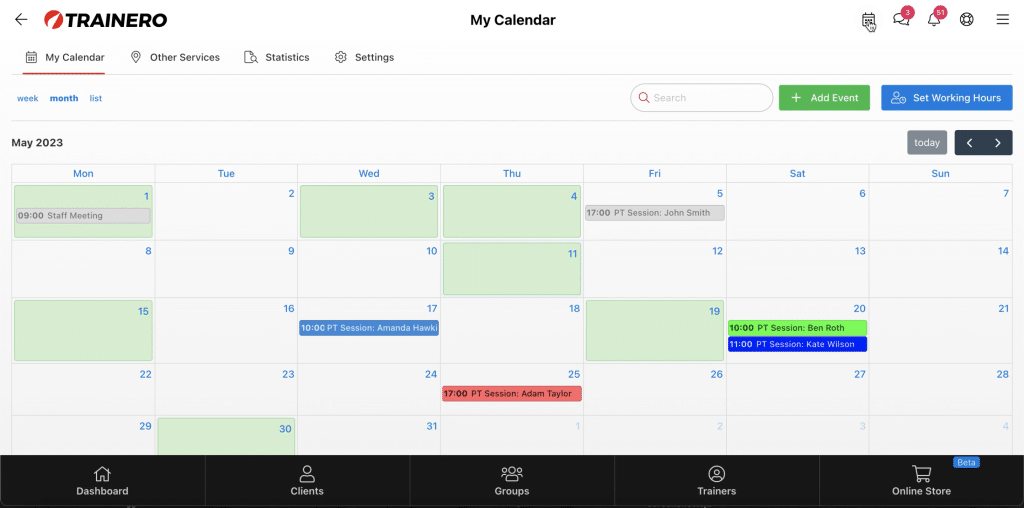
You became a personal trainer because you love helping people transform their lives, not because you enjoy sending the same check-in email for the fifteenth time this week.
Yet here you are. Scrolling through your client list, trying to remember who needs their program updated, who hasn’t logged a workout in five days, and whether you already sent that nutrition guide to your new 8-week group. Sound familiar?
The uncomfortable truth is this: the more clients you take on, the more your brain becomes the bottleneck. And when things slip through the cracks — a forgotten follow-up, a late program delivery, a missed check-in — it’s your reputation and your clients’ results that suffer.
The smartest trainers have figured this out. They don’t try to carry it all in their heads. Instead, they build systems that handle the repetitive work automatically, freeing their mental energy for the things that actually require a human touch: coaching, motivating, and problem-solving.
Let’s talk about why this matters — and how Trainero’s Timeline feature makes it remarkably easy to do.
The Hidden Cost of “I’ll Just Remember”
Every personal trainer starts out managing things manually. With three or four clients, it works. You remember their programs, their preferences, their progress. You send messages when the moment feels right.
But somewhere between client number ten and client number thirty, the system breaks down. Not dramatically — quietly. You forget to send the warm welcome message to a new client. You realize on Thursday that you were supposed to update someone’s program on Monday. A group participant asks about the nutrition plan you promised last week, and you feel that sinking feeling in your stomach.
This isn’t a failure of discipline. It’s a failure of strategy. The human brain simply isn’t designed to track dozens of parallel, time-sensitive tasks across multiple people over weeks and months. Research in cognitive psychology has a name for this: cognitive load. The more items you try to hold in working memory, the worse your performance becomes on all of them.
For a personal trainer, excessive cognitive load doesn’t just cause stress. It has tangible business consequences. Clients who feel forgotten don’t renew. Inconsistent communication erodes trust. And the mental exhaustion of trying to remember everything leaves you with less creative energy for the work that actually grows your business.

Unlock your fitness potential with Trainero! Get a 14-day free trial and access personalized workout plans, expert coaching, and progress tracking—all in one app. No commitments, just results. Start your free trial today and take your fitness journey to the next level!
What Does Automation Actually Mean for a Personal Trainer?
When trainers hear “automation,” they sometimes picture something cold and impersonal — generic mass emails or robotic chatbots. That’s not what we’re talking about here.
Automation for personal trainers means pre-building the recurring elements of your coaching process so they’re delivered consistently, on time, every time — without requiring you to manually trigger each one. It’s the difference between being a short-order cook who starts from scratch with every plate and being a head chef who has prep systems in place so the kitchen runs smoothly.
Think about the tasks you repeat with nearly every client. There’s a pattern to your coaching, whether you’ve formalized it or not. New clients probably go through a similar onboarding process. Most clients get check-ins at regular intervals. Program progressions follow a logical sequence. Motivational touchpoints happen at predictable moments — the two-week slump, the mid-program plateau, the final push before a program ends.
All of these are candidates for automation. Not because they don’t matter, but precisely because they matter too much to leave to chance and memory.
Enter the Timeline: Your Coaching Autopilot
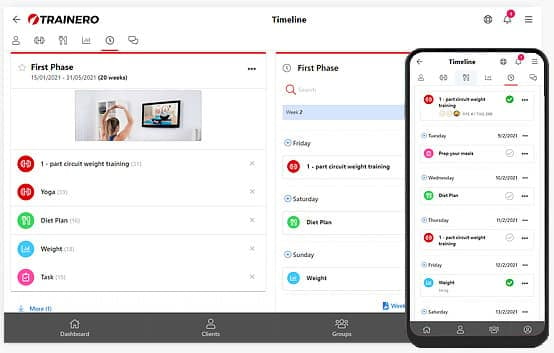
Trainero’s Timeline feature was designed specifically for this purpose. Think of it as a master blueprint for your entire coaching journey — one that you build once and then deploy to as many clients or groups as you need.
Here’s how it works in practice.
Build Once, Use Endlessly
A Timeline is structured around weeks and days. You create a timeline — say, a 12-week transformation program — and populate each week with the events, content, and touchpoints your clients will receive. These can include:
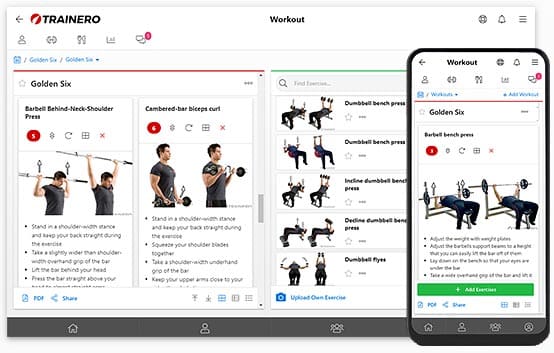
- Workouts — fully detailed training programs delivered on specific days
- Nutrition plans — meal plans and dietary guidance scheduled at the right moments
- Measurements and progress tracking — automated prompts for clients to log their weight, body measurements, photos, or other metrics
- Videos and educational content — technique tutorials, motivational videos, or informational resources
- Automatic emails — scheduled messages that land in your client’s inbox exactly when planned
- Push notifications — direct alerts to your client’s mobile device for timely reminders or motivation
- Chat messages — pre-scheduled messages that appear in the in-app conversation
- Tasks and appointments — action items and scheduled sessions
Once you’ve built a Timeline, you can assign it to an individual client or an entire group. Trainero then handles the delivery automatically. On Monday of week three, your client receives their updated workout. On Wednesday, a push notification reminds them to log their measurements. On Friday, an encouraging email arrives. You didn’t have to remember any of it.
The Power of the Template Approach
Here’s where it gets really powerful. You don’t start from scratch for every client. You can duplicate an existing Timeline and customize it. So if you’ve built a solid 8-week beginner program, you can copy it, adjust the training loads and nutritional targets for a new client’s needs, and deploy it in minutes rather than hours.
This template approach means your standard of service actually improves as you scale. Your hundredth client gets the same carefully designed journey as your first — because the system ensures nothing gets skipped.

Groups at Scale
Perhaps the most impressive capability is group management. You can create a Timeline for a group of hundreds — even thousands — of participants. The content is distributed individually to each person, so every participant experiences it as a personal journey, even though you built it once.
Imagine running a 6-week nutrition challenge with 200 participants. Without automation, you’d need to manually send workouts, check-in prompts, educational content, and motivational messages to each person every week. That’s simply not humanly possible at a high quality level. With a Timeline, you design the entire 6-week experience once, assign it to the group, and Trainero delivers everything on schedule while you focus on responding to individual questions and providing personal coaching where it counts.
Real-World Automation Workflows That Save Hours Every Week
Let’s get specific about how trainers actually use the Timeline to reclaim their time.
1. The Automated Client Onboarding Sequence
Instead of manually walking each new client through the same steps, build a Week 1 Timeline that handles onboarding automatically:
- Day 1: Welcome message via push notification + introductory video explaining how to use the app and what to expect
- Day 1: Initial measurement request (weight, photos, key body measurements)
- Day 2: First workout program delivered
- Day 2: Nutrition plan delivered with an explanatory email about macros and meal timing
- Day 3: Check-in chat message asking how the first workout went
- Day 5: Educational video on recovery and sleep
- Day 7: End-of-week survey or measurement prompt + encouraging email summarizing what’s ahead in Week 2
Every new client gets the same thorough, professional onboarding — whether you sign them up at 2 PM or 2 AM.
2. The Progressive Training Program
Build the entire periodization plan into the Timeline. Weeks 1-4 might be a foundation phase with three training days per week. Weeks 5-8 ramp up intensity. Weeks 9-12 peak and then taper. Each week’s workouts are pre-loaded and delivered on schedule.
You’re not scrambling to write next week’s program on Sunday night. It’s already there, waiting to be delivered.
3. The Motivation and Accountability Engine
Schedule strategic touchpoints throughout the program:
- Week 2 midpoint: A push notification acknowledging that the initial excitement may be fading and offering strategies to stay consistent
- Week 4: A progress review prompt with measurements, plus an email celebrating how far they’ve come
- Week 6: A video from you addressing the common mid-program plateau
- Week 8: A “final stretch” message with renewed energy and clear goals for the remaining weeks
These are the kinds of touches that make clients feel truly coached — and they happen automatically because you planned them in advance.
4. The Recurring Check-In System
Set up weekly measurement events every Monday and a check-in chat message every Friday. Across 20 clients over a 12-week program, that’s 480 individual touchpoints you don’t have to manually initiate. The Timeline handles the prompts; you handle the responses.
Why This Makes You a Better Coach, Not a Lazier One
There’s a misconception that automation makes coaching impersonal. The reality is the opposite. When you’re not drowning in administrative tasks, you have more bandwidth for the interactions that truly matter.
Consider two scenarios:
Trainer A manages everything manually. By Thursday, they’re behind on three program updates, forgot to send check-in messages to two clients, and spent their morning writing the same email they’ve written fifty times before. When a client messages with a genuine concern about knee pain during squats, Trainer A gives a rushed, distracted response.
Trainer B has automated the recurring elements with Timelines. Programs are delivered on schedule. Check-ins go out automatically. When that same client messages about knee pain, Trainer B has the mental space and time to give a thoughtful, detailed response — maybe even record a quick video showing a modified squat variation.
Which trainer is providing better service? Which one will retain more clients?
Automation doesn’t replace the human element. It protects it. By offloading the predictable and repetitive, you preserve your energy and attention for the unpredictable and personal — which is where great coaching actually lives.
Getting Started: A Practical Blueprint
Start with what you repeat most. Look at your last two weeks of work. Which tasks did you do for nearly every client? That’s your first automation candidate. For most trainers, it’s program delivery and weekly check-ins.
Build your first Timeline as a template. Pick your most common client type — maybe it’s a general fitness beginner doing a 12-week program. Build the complete Timeline for that archetype: workouts, nutrition, check-ins, measurements, motivational touchpoints. Get it right once.
Duplicate and customize. The next time a similar client signs up, copy the template. Adjust the specifics — training loads, dietary numbers, any personal modifications — and activate it. What used to take hours now takes minutes.
Expand gradually. Once your first template is running smoothly, build another one. Maybe it’s a weight loss program, or an advanced strength program, or a 6-week group challenge. Over time, you’ll have a library of proven coaching blueprints ready to deploy.
Use the weekly reports. Trainero provides weekly activity reports showing which clients have completed their tasks and events. Use these to identify who needs personal attention — a message of encouragement for the client who’s crushing it, a concerned check-in for the one who’s gone quiet. This is smart, targeted coaching enabled by automated tracking.
The Bottom Line
The fitness industry rewards consistency, and your clients’ results depend on receiving the right guidance at the right time. That’s a promise no human memory can reliably keep across dozens of clients over months of coaching.
Trainero’s Timeline feature isn’t about removing the personal from personal training. It’s about ensuring that every client receives a complete, thoughtful coaching experience — regardless of how many clients you’re managing or how hectic your Tuesday gets.
The trainers who thrive in this industry aren’t the ones who work the hardest. They’re the ones who work the smartest. And smart means building systems that handle the routine so you can focus on the remarkable.
Stop trying to remember everything. Start building Timelines that remember for you.
Ready to automate your coaching workflow? Try Trainero’s Timeline feature and discover how much time you can reclaim for the coaching that actually matters.
Unlock your fitness potential with Trainero! Get a 14-day free trial and access personalized workout plans, expert coaching, and progress tracking—all in one app. No commitments, just results. Start your free trial today and take your fitness journey to the next level!